> ## Documentation Index
> Fetch the complete documentation index at: https://cometchat-22654f5b-docs-ios-ui-kit-sdk-fixes.mintlify.site/llms.txt
> Use this file to discover all available pages before exploring further.
# WordPress Widget (Legacy)
## Overview
The Widget simplifies the process of integrating a chat functionality on your website. As a developer, you only need to toggle the widget's settings from our Dashboard and customize it to fit your needs. Within a few minutes, you can get started with our widget.
The Chat Widget is available for the following platforms:
1. HTML / Bootstrap / jQuery
2. WordPress
## Prerequisite
1. [Login](https://app.cometchat.com/login) to CometChat Dashboard and select your app.
2. Click on the **Chats tab**, then select **Widgets** from the left navigation pane.
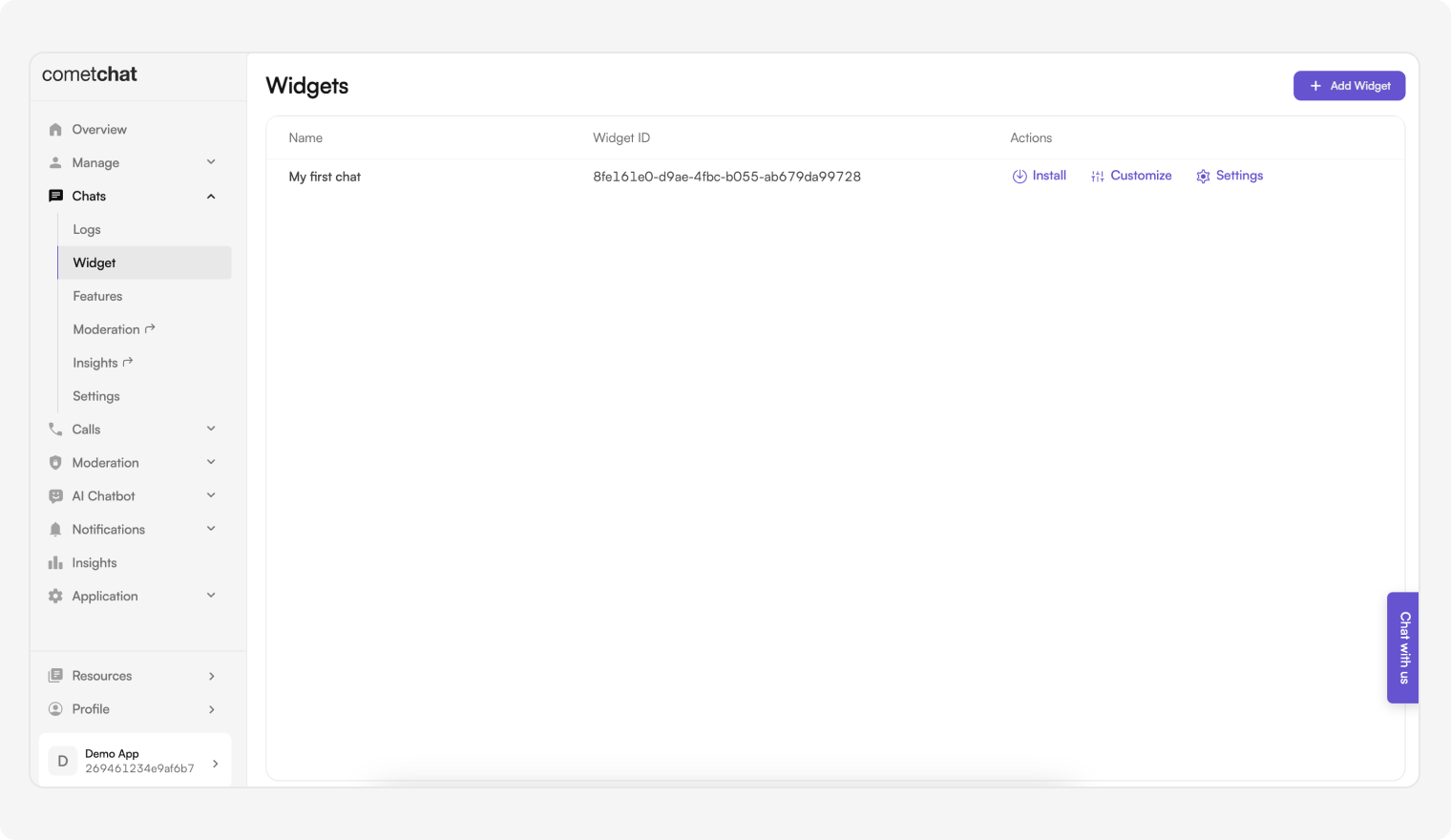 3. You can create new widgets as well as see a list of existing ones here.
## Features of Widget
| Features | Description |
| --------- | ----------------------------------------------------------------------------------------------- |
| Install | This provides the required details about a widget so that it can be integrated in your website. |
| Customize | Change the widget's name, docked layout icons and colors, custom JS and CSS. |
| Settings | Configure what shows up in the sidebar as well as in the chat component. |
***
## WordPress / BuddyPress
### Before getting started
Go through the [overview](#overview) to set up Chat Widget from the CometChat Dashboard.
### Installation
1. [Download the CometChat Pro](https://kernl.us/api/v1/archive/688bbf1f5a0dc110ce1bfafe) plugin.
2. In WordPress Admin, go to **Plugins → Add New**.
3. You can create new widgets as well as see a list of existing ones here.
## Features of Widget
| Features | Description |
| --------- | ----------------------------------------------------------------------------------------------- |
| Install | This provides the required details about a widget so that it can be integrated in your website. |
| Customize | Change the widget's name, docked layout icons and colors, custom JS and CSS. |
| Settings | Configure what shows up in the sidebar as well as in the chat component. |
***
## WordPress / BuddyPress
### Before getting started
Go through the [overview](#overview) to set up Chat Widget from the CometChat Dashboard.
### Installation
1. [Download the CometChat Pro](https://kernl.us/api/v1/archive/688bbf1f5a0dc110ce1bfafe) plugin.
2. In WordPress Admin, go to **Plugins → Add New**.
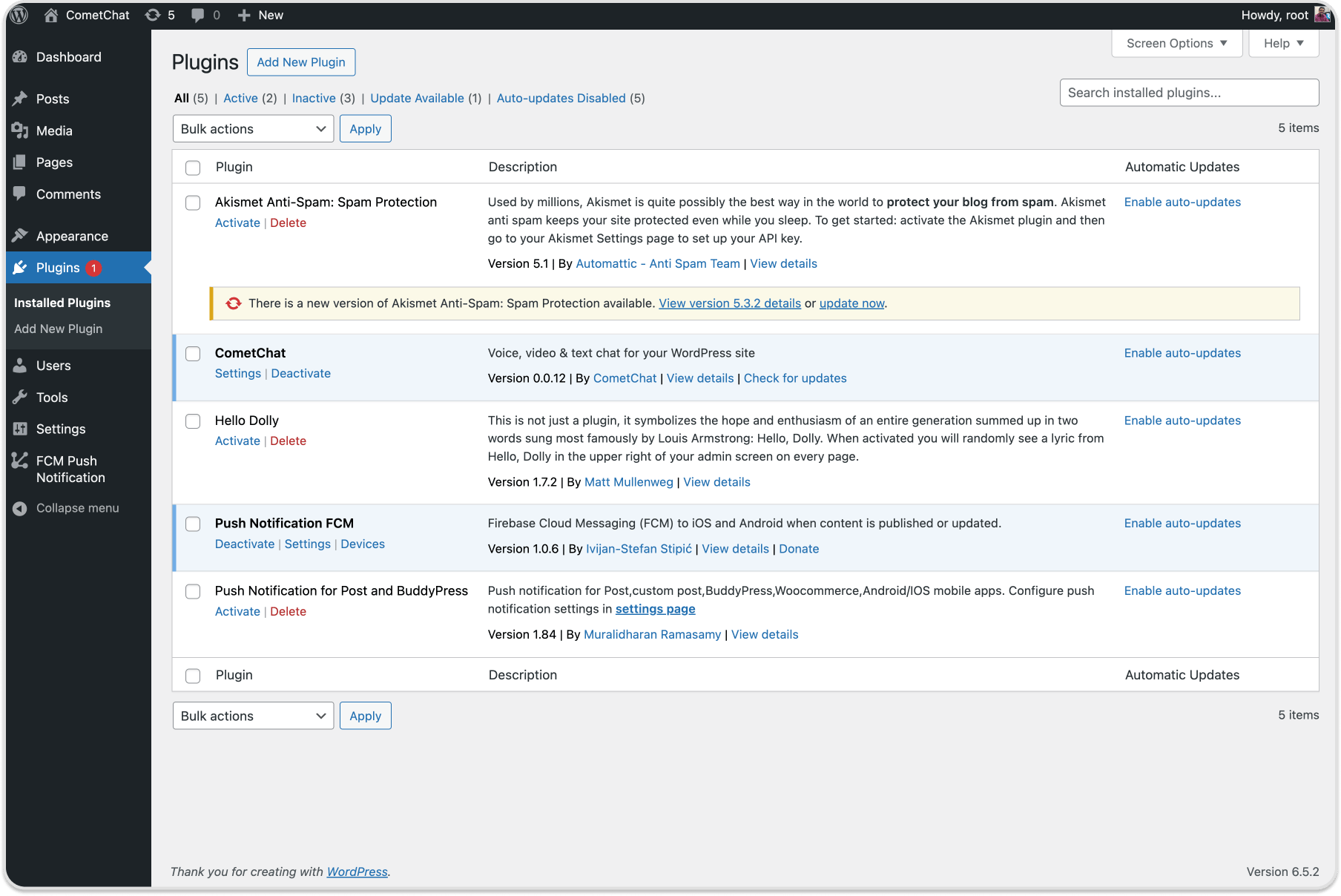 3. Click **Upload Plugin**, choose the zip, then click **Install Now**.
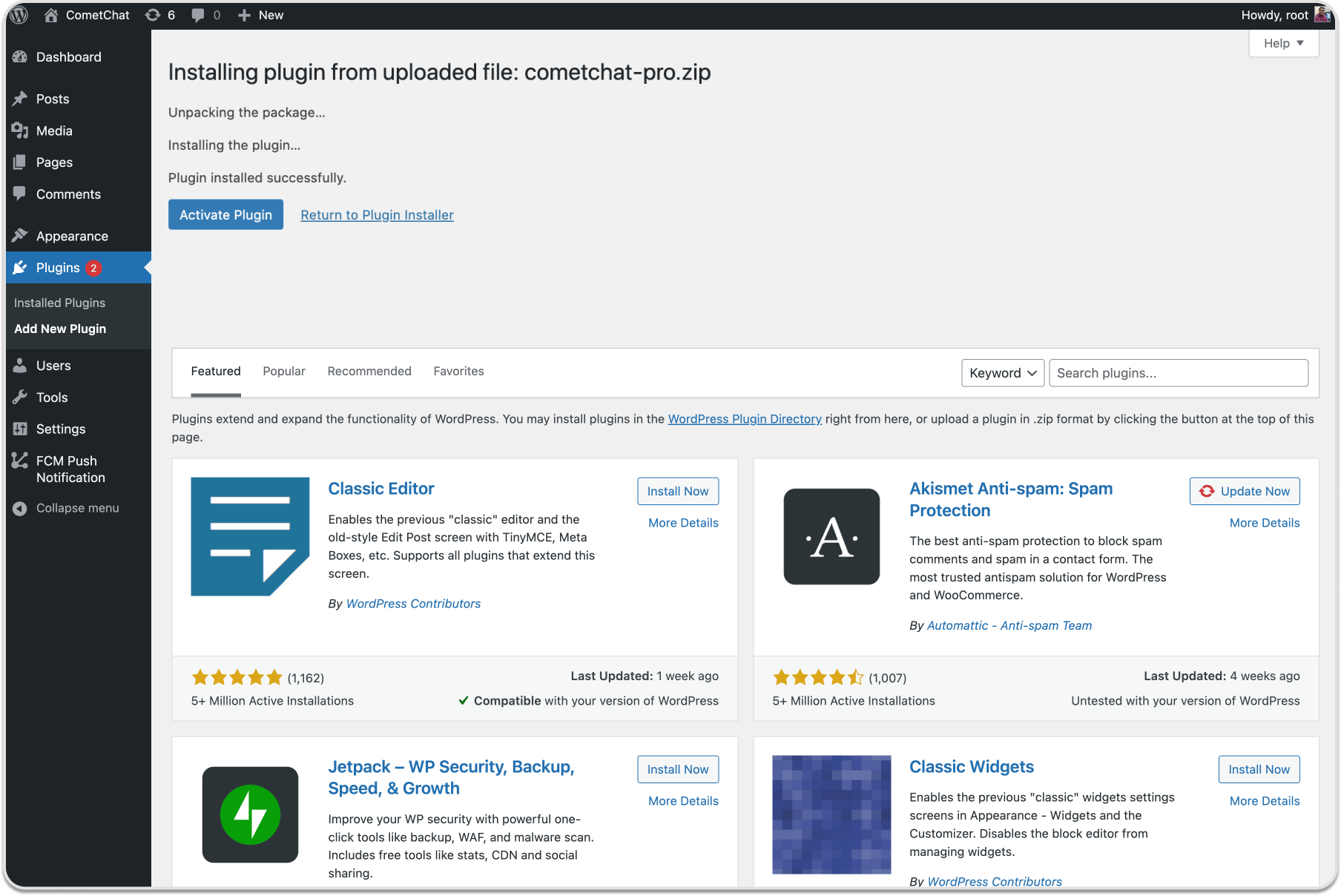
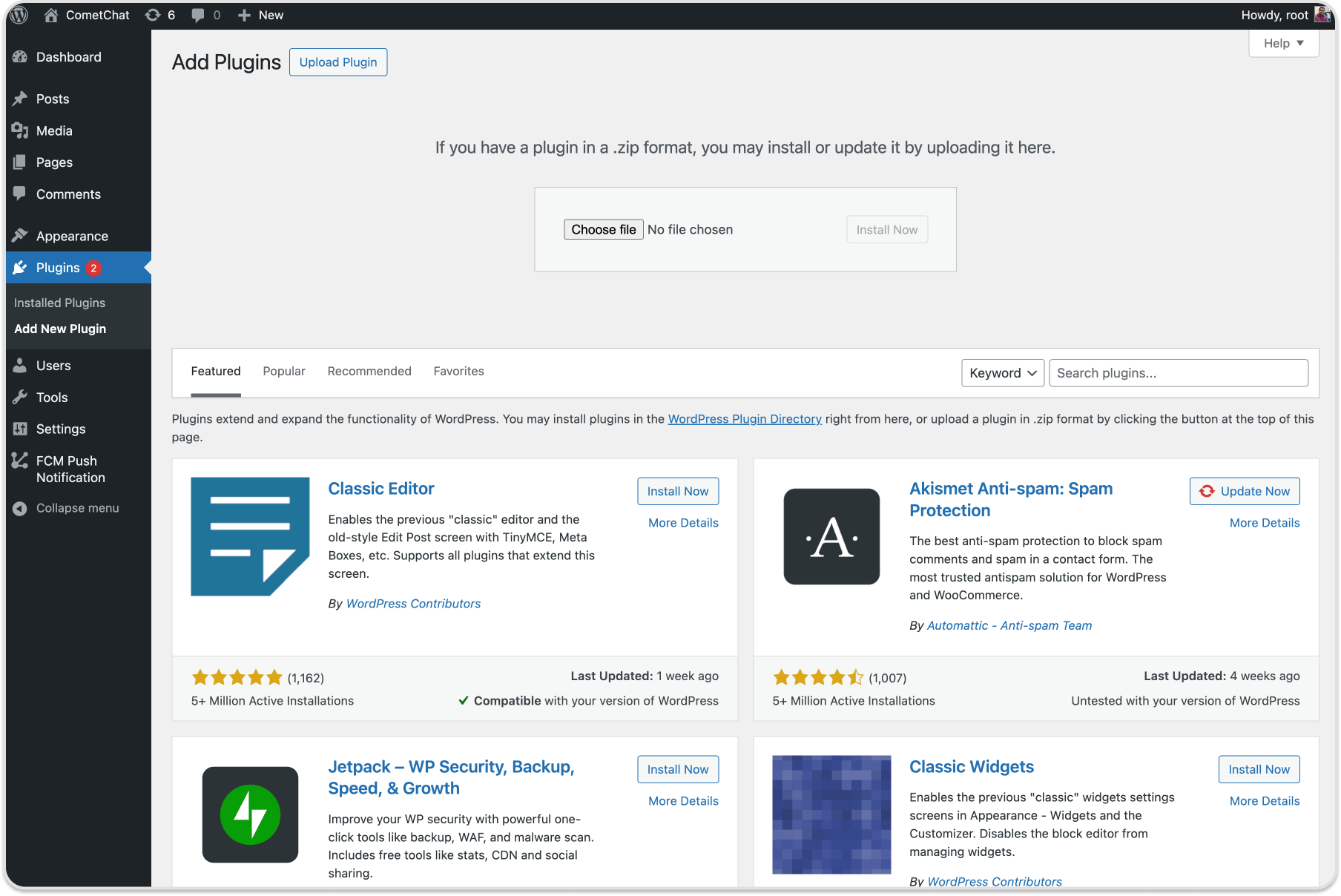 4. After upload completes, click **Activate Plugin**.
 ### Configuration
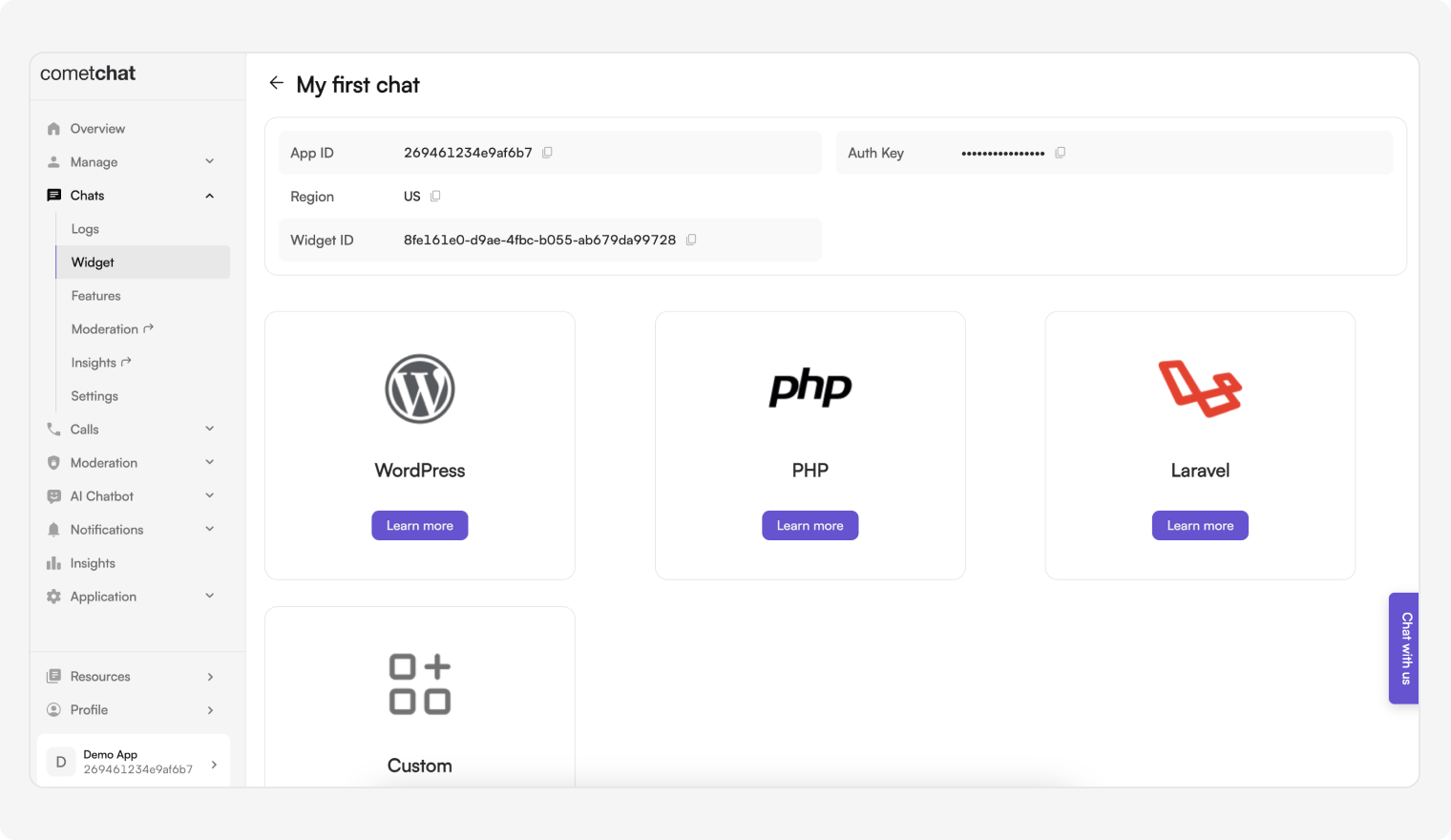
1. Get **App ID**, **Region**, **REST API Key**, and **Auth Key** from **CometChat Dashboard → Chats → Widget**.
### Configuration
1. Get **App ID**, **Region**, **REST API Key**, and **Auth Key** from **CometChat Dashboard → Chats → Widget**.
 2. In WordPress go to **Settings → CometChat Pro**, then set:
* `App ID`
* `Region`
* `REST API Key`
* `Auth Key`
2. In WordPress go to **Settings → CometChat Pro**, then set:
* `App ID`
* `Region`
* `REST API Key`
* `Auth Key`
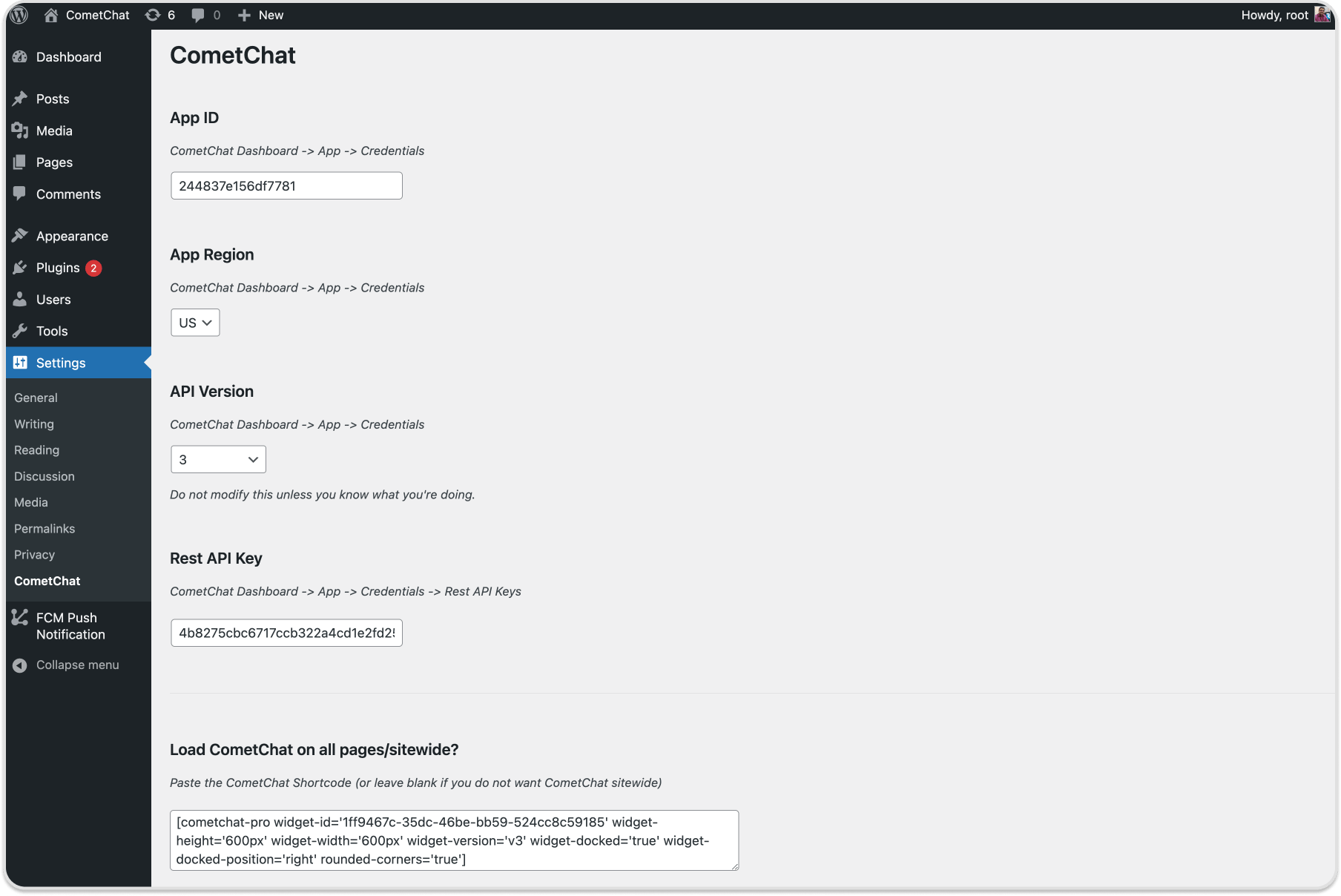 3. Click **Update Settings**. The logged-in WordPress user will be registered in CometChat.
4. Choose layout:
* Embedded Layout
* Docked Layout
### Embedded Layout
3. Click **Update Settings**. The logged-in WordPress user will be registered in CometChat.
4. Choose layout:
* Embedded Layout
* Docked Layout
### Embedded Layout
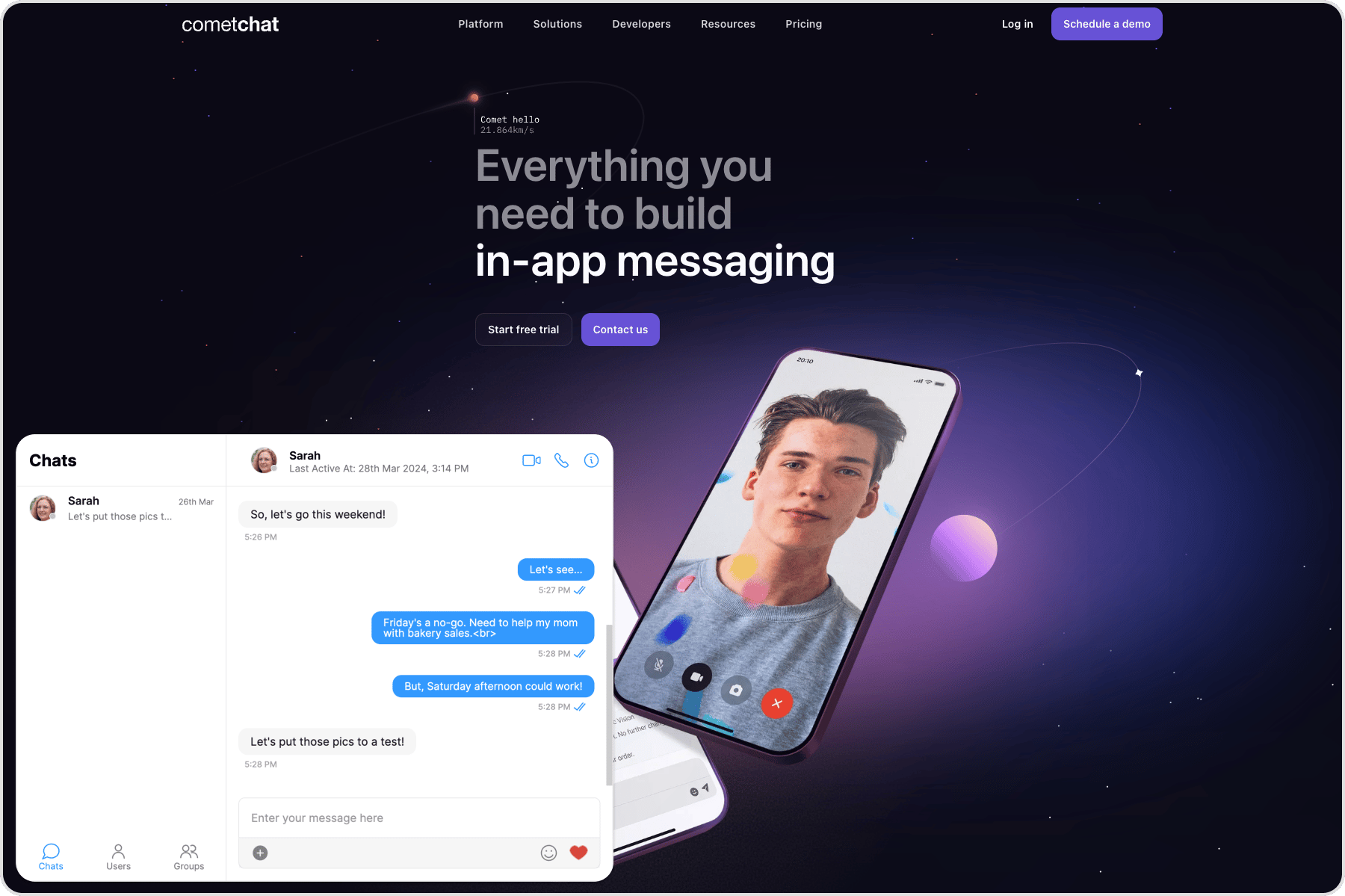 Use the shortcode to load the Chat Widget in embedded layout. Configure keys as needed.
Replace `WIDGET_ID` with your Widget ID.
```
[cometchat-pro widget-id='WIDGET_ID' widget-height='600px' widget-width='600px' widget-version='v3']
```
Configurable keys:
| Keys | Description |
| -------------- | --------------------------------------------- |
| widget-id | ID of the widget from the CometChat dashboard |
| widget-width | Width of the widget |
| widget-height | Height of the widget |
| widget-version | Version of the Chat Widget |
Optional parameters:
| Keys (optional) | Description |
| ---------------- | --------------------------------------------- |
| default-username | Default user to start a conversation with |
| default-id | UID (user) or GUID (group) to show by default |
| default-type | `user` or `group` depending on default-id |
| rounded-corners | Boolean to enable/disable rounded corners |
### Docked Layout
Use the shortcode to load the Chat Widget in embedded layout. Configure keys as needed.
Replace `WIDGET_ID` with your Widget ID.
```
[cometchat-pro widget-id='WIDGET_ID' widget-height='600px' widget-width='600px' widget-version='v3']
```
Configurable keys:
| Keys | Description |
| -------------- | --------------------------------------------- |
| widget-id | ID of the widget from the CometChat dashboard |
| widget-width | Width of the widget |
| widget-height | Height of the widget |
| widget-version | Version of the Chat Widget |
Optional parameters:
| Keys (optional) | Description |
| ---------------- | --------------------------------------------- |
| default-username | Default user to start a conversation with |
| default-id | UID (user) or GUID (group) to show by default |
| default-type | `user` or `group` depending on default-id |
| rounded-corners | Boolean to enable/disable rounded corners |
### Docked Layout
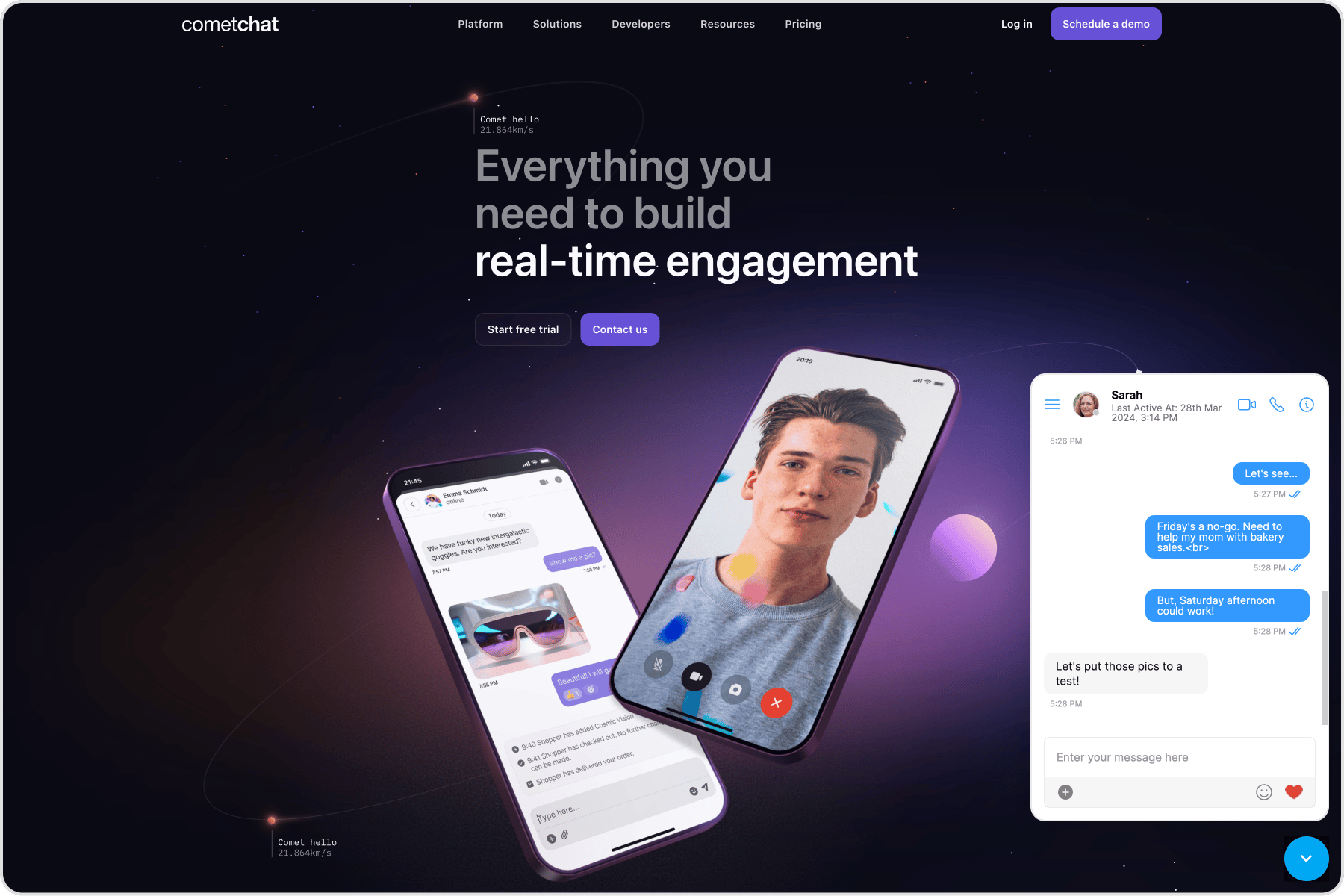 Use the shortcode to load the Chat Widget in docked layout.
Replace `WIDGET_ID` with your Widget ID.
```
[cometchat-pro widget-id='WIDGET_ID' widget-height='600px' widget-width='600px' widget-version='v3' widget-docked='true' widget-docked-position='right' rounded-corners='true']
```
Configurable keys:
| Keys | Description |
| ---------------------- | --------------------------------------------- |
| widget-id | ID of the widget from the CometChat dashboard |
| widget-width | Width of the widget |
| widget-height | Height of the widget |
| widget-version | Version of the Chat Widget |
| widget-docked | Boolean to show/hide docked layout |
| widget-docked-position | `left` or `right` alignment |
Optional parameters are the same as embedded layout (default-username, default-id, default-type, rounded-corners).
### Show docked layout on all pages
1. Go to **Settings → CometChat Pro** in WordPress.
2. Paste the docked shortcode under **Load CometChat Pro on all pages/sitewide?** to show it everywhere.
***
## Advanced Features
### Open or close chat window
```javascript theme={null}
CometChatWidget.openOrCloseChat(FLAG); // true or false
```
| Parameter | Description | Type |
| --------- | ------------------------------------------------ | -------- |
| FLAG | `true` opens the chat window, `false` closes it. | Required |
### Chat with a particular user
```javascript theme={null}
CometChatWidget.chatWithUser(UID);
```
| Parameter | Description | Type |
| --------- | --------------------------- | -------- |
| UID | ID of the user to chat with | Required |
### Chat with a particular group
```javascript theme={null}
CometChatWidget.chatWithGroup(GUID);
```
| Parameter | Description | Type |
| --------- | ---------------------------- | -------- |
| GUID | ID of the group to chat with | Required |
### Initiate calls with a particular user
```javascript theme={null}
CometChatWidget.callUser(UID);
```
| Parameter | Description | Type |
| --------- | -------------------------------------- | -------- |
| UID | ID of the user to initiate a call with | Required |
### Initiate calls with a particular group
```javascript theme={null}
CometChatWidget.callGroup(GUID);
```
| Parameter | Description | Type |
| --------- | --------------------------------------- | -------- |
| GUID | ID of the group to initiate a call with | Required |
### Message Listener
```javascript theme={null}
CometChatWidget.on("onMessageReceived", (args) => {
console.log("CometChatWidget onMessageReceived", args);
});
```
### Chat open state listener
```javascript theme={null}
CometChatWidget.launch({
// Embedded or Docked layout configuration
}).then(() => {
CometChatWidget.on("openChat", (args) => {
console.log("CometChatWidget Chat is open", args);
});
});
```
### Chat closed state listener
```javascript theme={null}
CometChatWidget.launch({
// Embedded or Docked layout configuration
}).then(() => {
CometChatWidget.on("closeChat", (args) => {
console.log("CometChatWidget Chat is closed", args);
});
});
```
### Localization
```javascript theme={null}
CometChatWidget.localize(LANGUAGE_CODE);
```
Supported languages include: en, zh, es, hi, ru, ar, pt, ms, fr, de, sv, lt, hu.
| Parameter | Description | Type |
| -------------- | ------------------------------------- | -------- |
| LANGUAGE\_CODE | Language code to localize widget text | Required |
Use the shortcode to load the Chat Widget in docked layout.
Replace `WIDGET_ID` with your Widget ID.
```
[cometchat-pro widget-id='WIDGET_ID' widget-height='600px' widget-width='600px' widget-version='v3' widget-docked='true' widget-docked-position='right' rounded-corners='true']
```
Configurable keys:
| Keys | Description |
| ---------------------- | --------------------------------------------- |
| widget-id | ID of the widget from the CometChat dashboard |
| widget-width | Width of the widget |
| widget-height | Height of the widget |
| widget-version | Version of the Chat Widget |
| widget-docked | Boolean to show/hide docked layout |
| widget-docked-position | `left` or `right` alignment |
Optional parameters are the same as embedded layout (default-username, default-id, default-type, rounded-corners).
### Show docked layout on all pages
1. Go to **Settings → CometChat Pro** in WordPress.
2. Paste the docked shortcode under **Load CometChat Pro on all pages/sitewide?** to show it everywhere.
***
## Advanced Features
### Open or close chat window
```javascript theme={null}
CometChatWidget.openOrCloseChat(FLAG); // true or false
```
| Parameter | Description | Type |
| --------- | ------------------------------------------------ | -------- |
| FLAG | `true` opens the chat window, `false` closes it. | Required |
### Chat with a particular user
```javascript theme={null}
CometChatWidget.chatWithUser(UID);
```
| Parameter | Description | Type |
| --------- | --------------------------- | -------- |
| UID | ID of the user to chat with | Required |
### Chat with a particular group
```javascript theme={null}
CometChatWidget.chatWithGroup(GUID);
```
| Parameter | Description | Type |
| --------- | ---------------------------- | -------- |
| GUID | ID of the group to chat with | Required |
### Initiate calls with a particular user
```javascript theme={null}
CometChatWidget.callUser(UID);
```
| Parameter | Description | Type |
| --------- | -------------------------------------- | -------- |
| UID | ID of the user to initiate a call with | Required |
### Initiate calls with a particular group
```javascript theme={null}
CometChatWidget.callGroup(GUID);
```
| Parameter | Description | Type |
| --------- | --------------------------------------- | -------- |
| GUID | ID of the group to initiate a call with | Required |
### Message Listener
```javascript theme={null}
CometChatWidget.on("onMessageReceived", (args) => {
console.log("CometChatWidget onMessageReceived", args);
});
```
### Chat open state listener
```javascript theme={null}
CometChatWidget.launch({
// Embedded or Docked layout configuration
}).then(() => {
CometChatWidget.on("openChat", (args) => {
console.log("CometChatWidget Chat is open", args);
});
});
```
### Chat closed state listener
```javascript theme={null}
CometChatWidget.launch({
// Embedded or Docked layout configuration
}).then(() => {
CometChatWidget.on("closeChat", (args) => {
console.log("CometChatWidget Chat is closed", args);
});
});
```
### Localization
```javascript theme={null}
CometChatWidget.localize(LANGUAGE_CODE);
```
Supported languages include: en, zh, es, hi, ru, ar, pt, ms, fr, de, sv, lt, hu.
| Parameter | Description | Type |
| -------------- | ------------------------------------- | -------- |
| LANGUAGE\_CODE | Language code to localize widget text | Required |